 CallerHub
Features and modules
The core – accept the number, query the data sources, return the name – is always active. Everything else is a module you switch on or off under Administration → Modules.
Five views. One picture of how reachable you are.
- 01
Statistics
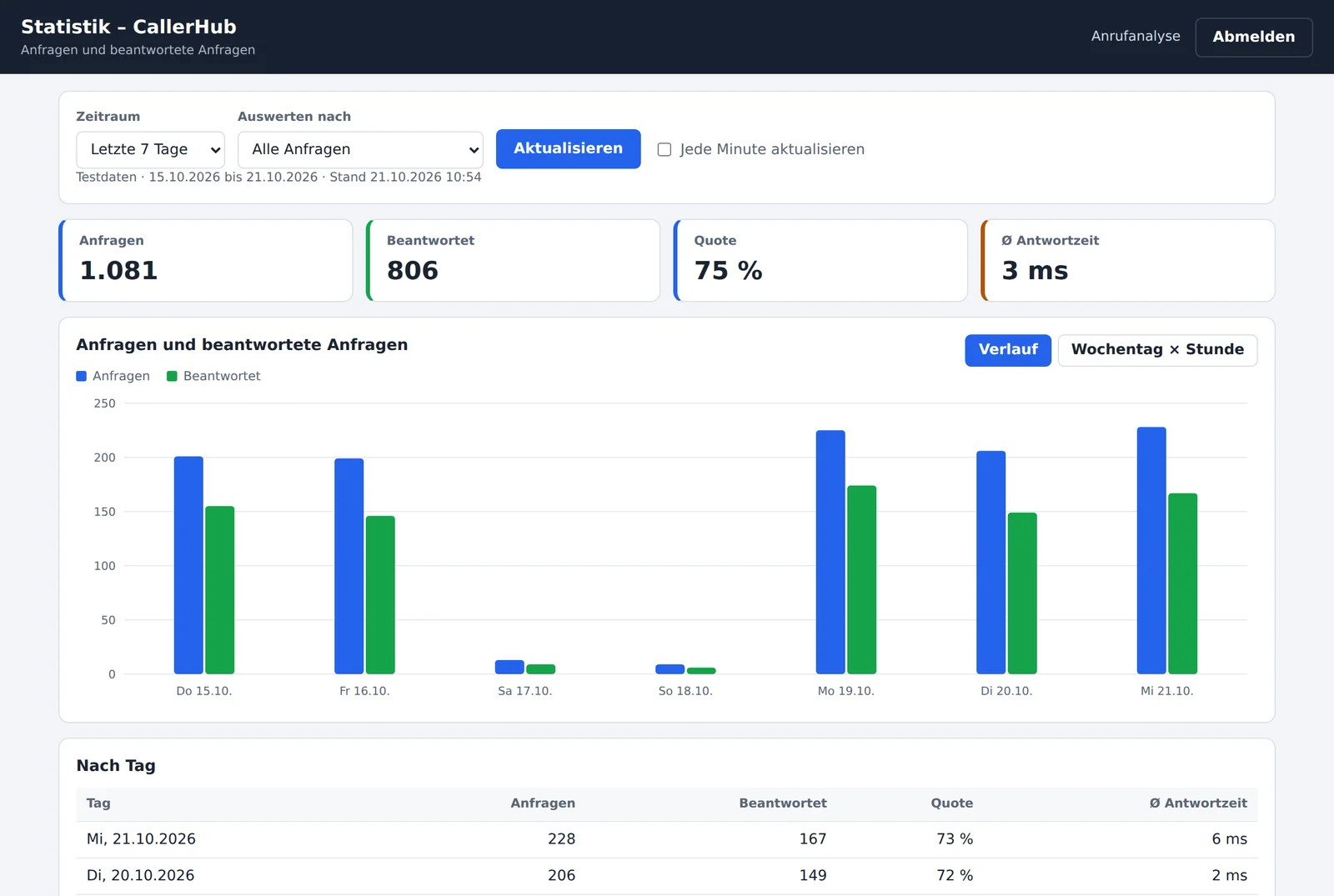
Requests, matches and unknown callers for any time period. A weekday × hour heat map shows the peak times.
Learn more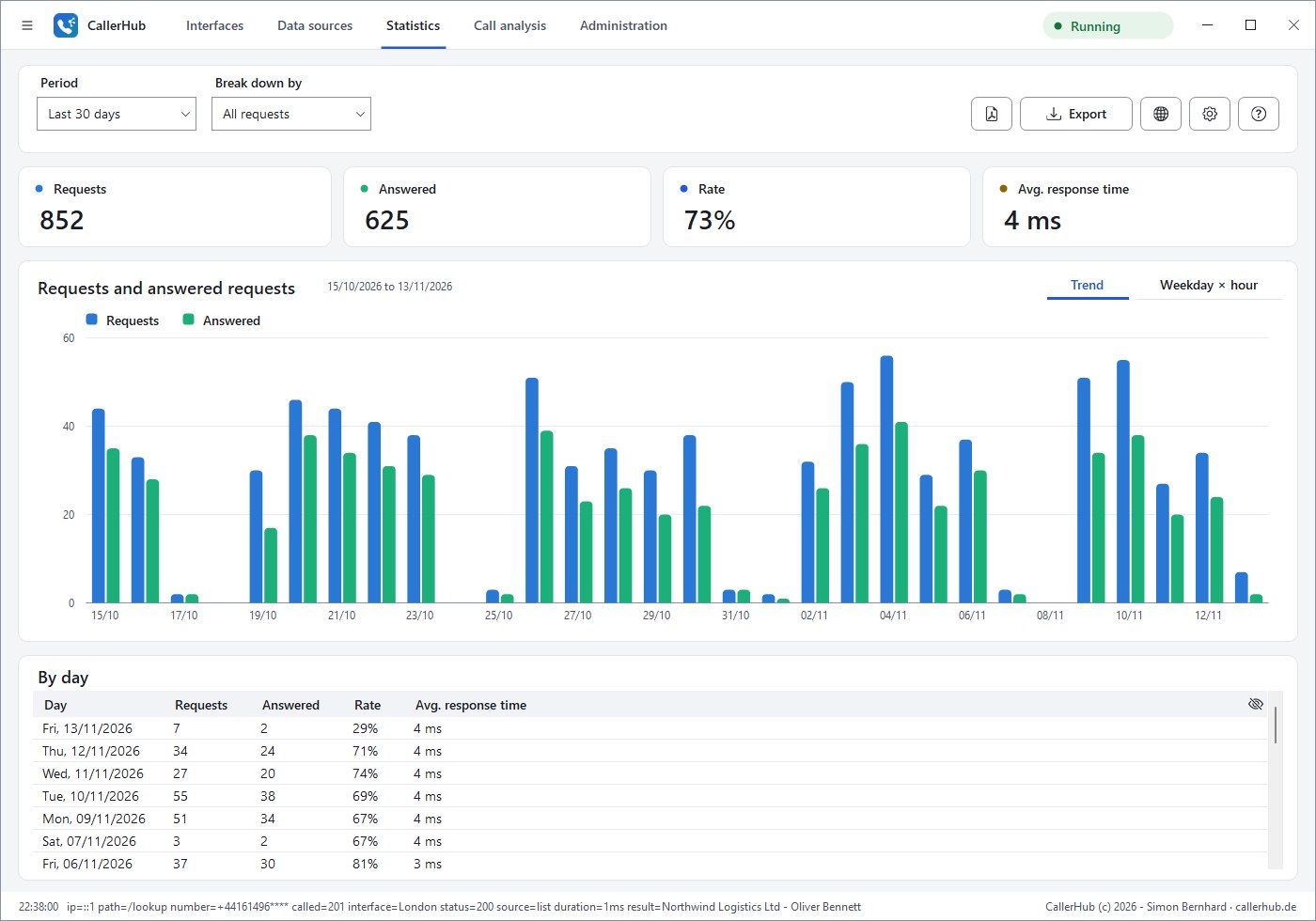
- 02
Call analytics
Analyses the call records of your phone system: answer rate, waiting time until answered and talk time; the full edition adds service level and callback rate.
Learn more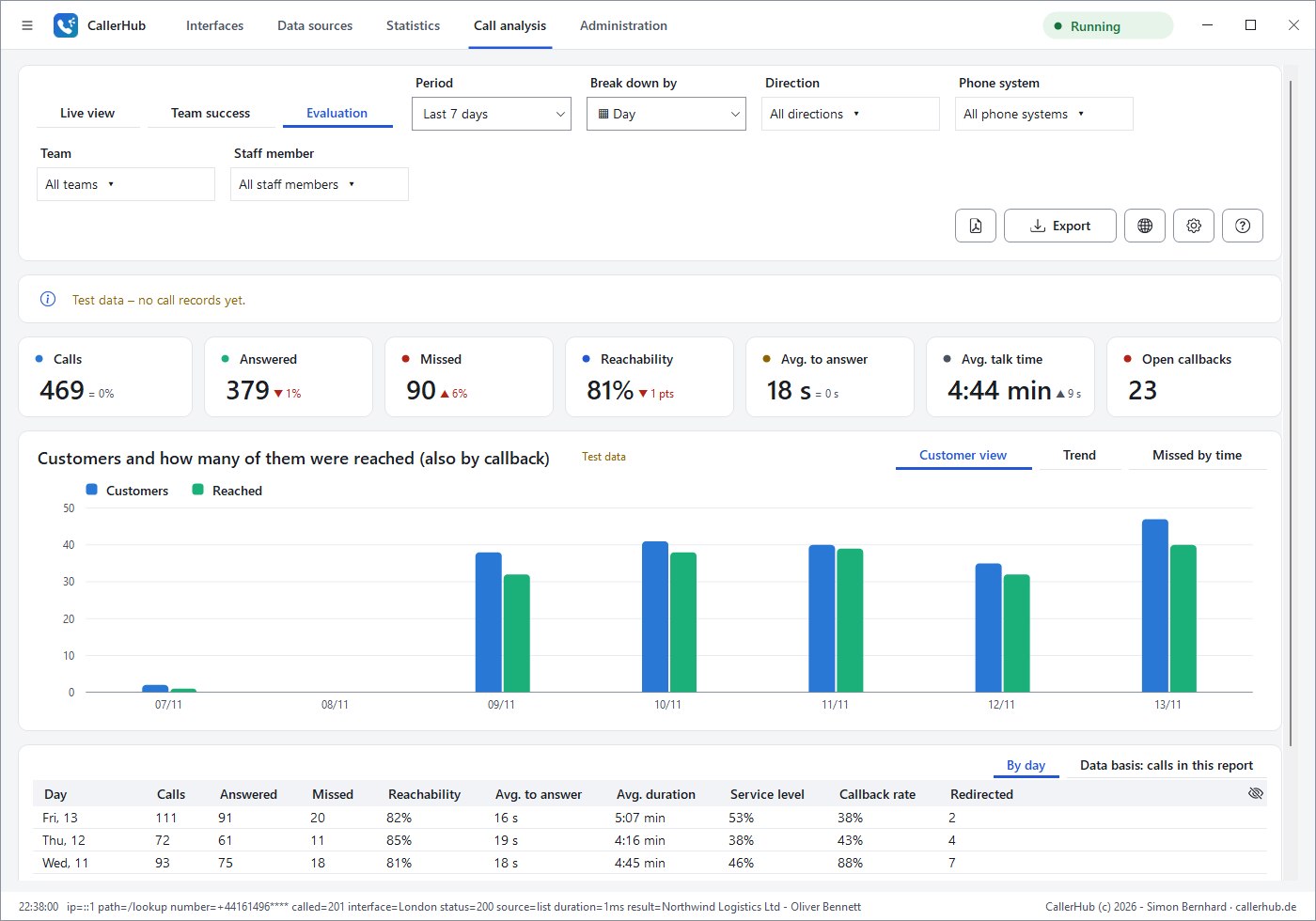
- 03
Live display
Per team: who is waiting right now, the longest waiting time and ongoing calls – in the app, in the browser or on a wall screen.
Learn more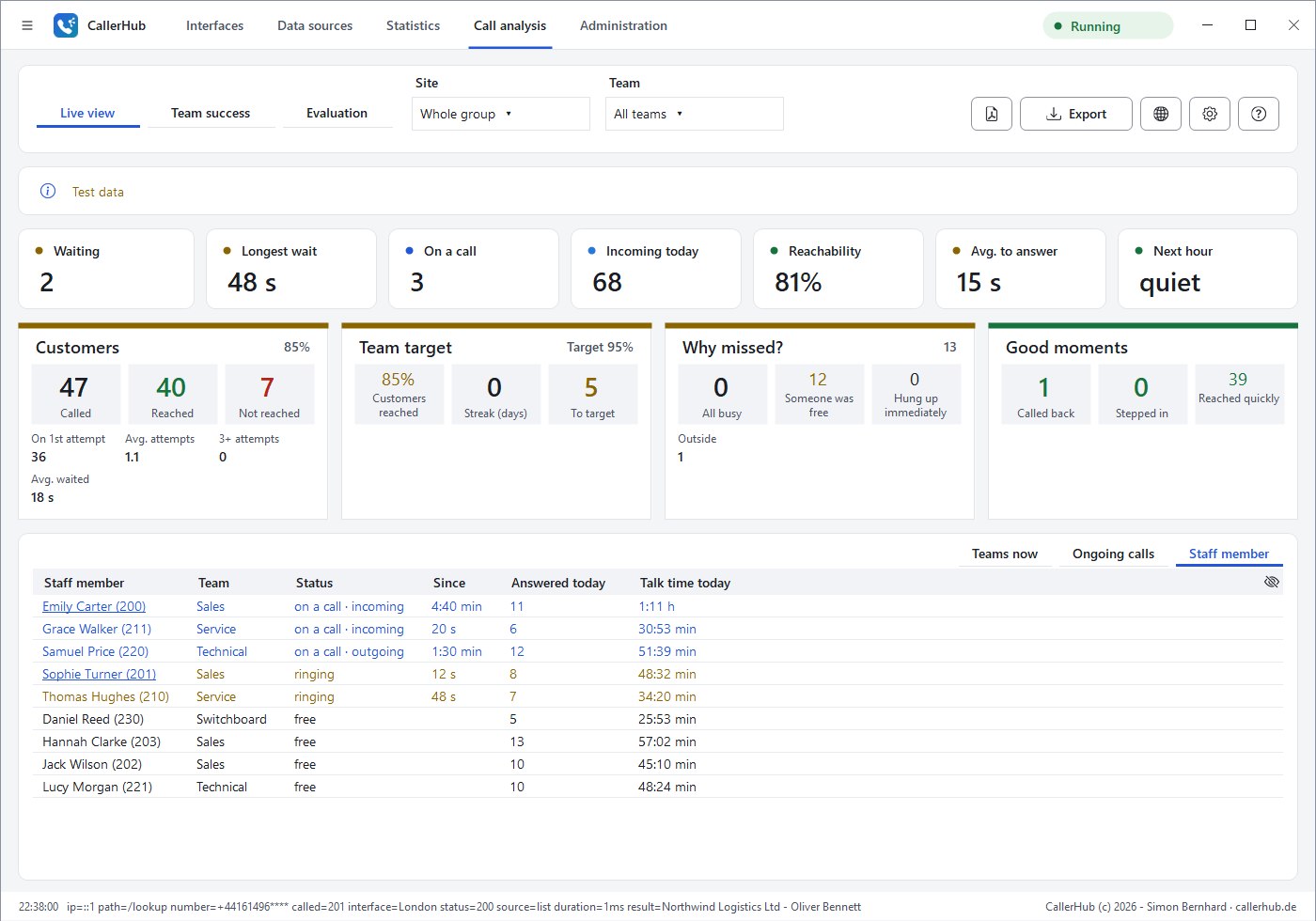
- 04
Team success
Positive reporting without leaderboards: everyone sees only themselves, plus the team as a whole.
Learn more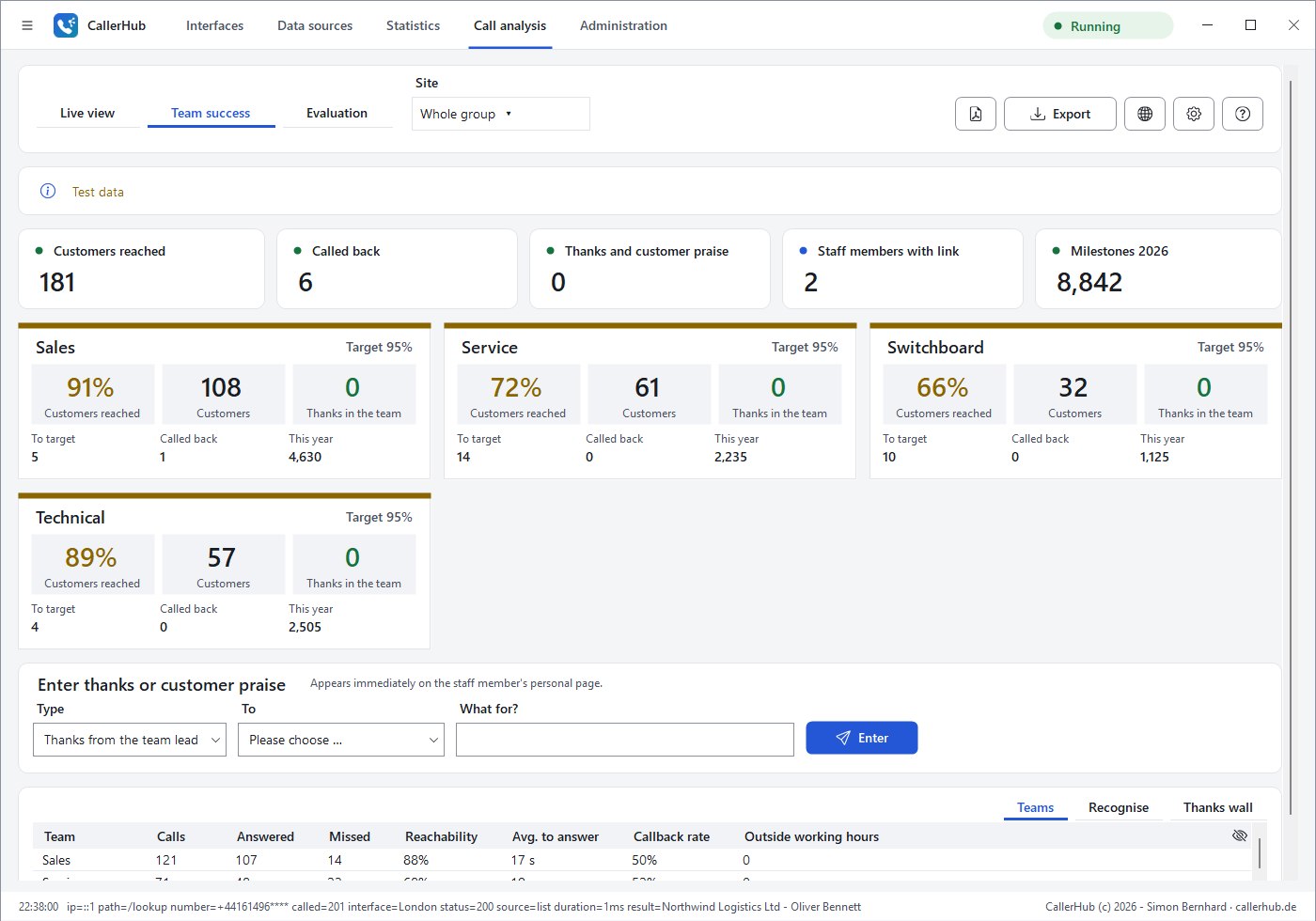
- 05
World map
Where your calls come from – countries, local areas and call flows to your phone systems.
Learn more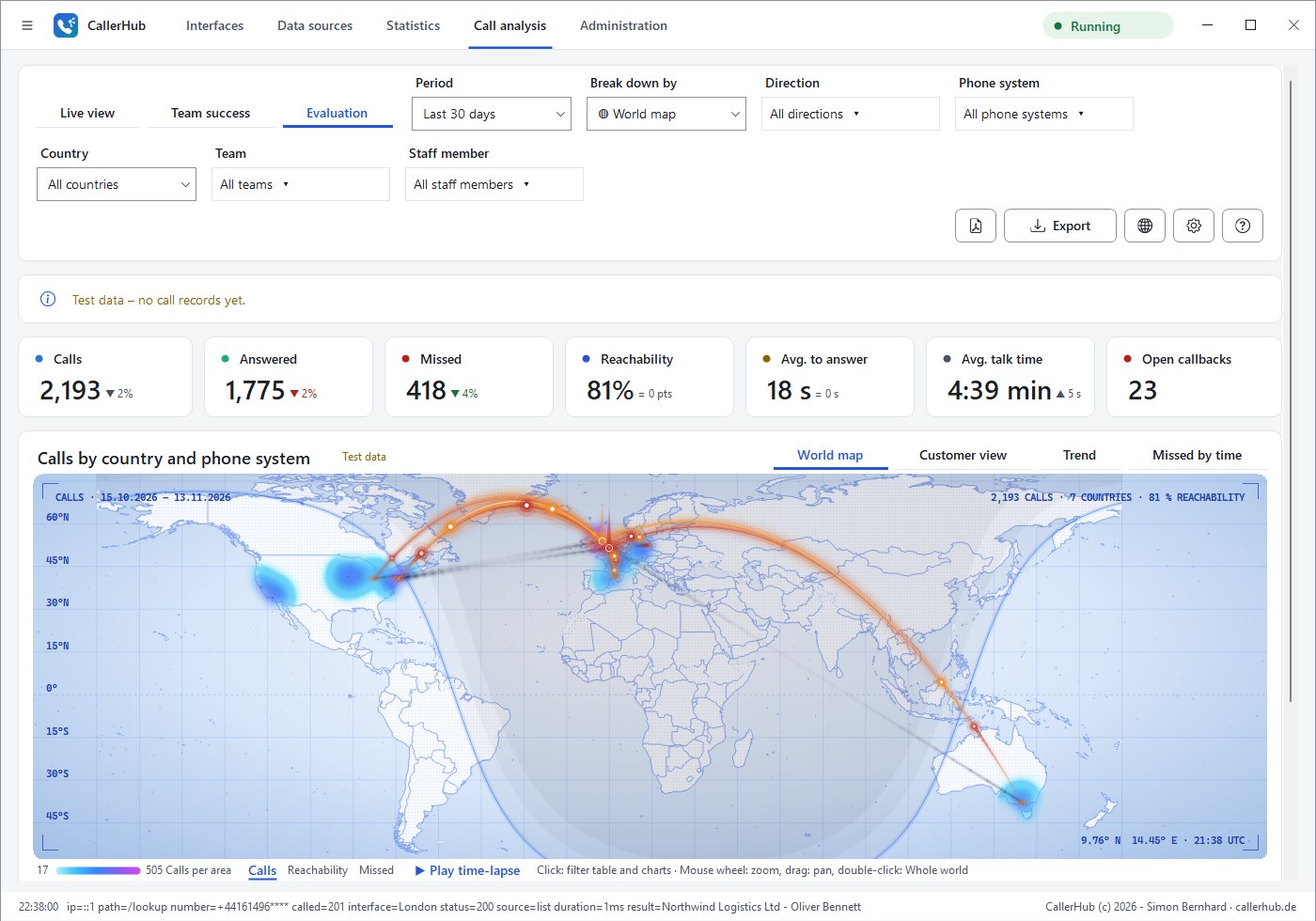

Modules at a glance
Every module card shows its status in the title bar, such as “Running”, “Incomplete” or “Error”. Modules of the full edition are marked.

| Module | Default | Function |
|---|---|---|
| Statistics | on | Requests and matches, charts, top callers, weekday × hour |
| Call analytics | off | Analysis of all calls, world map, customer view, live view and callback list |
| Team success | off | Personal page per employee, team goals, thanks – no leaderboards |
| Phone provisioning | off | Settings, keys, call info and team page for Mitel 6800/6900 |
| Phone numbers | on | Area, network operator and local time from the phone number; several numbers per field |
| Display name, block and VIP list | on | Replacements, blocked and important phone numbers |
| Phone book (LDAP and export) | off | LDAP phone book, export for FRITZ!Box, Outlook and cloud phone systems |
| Browser access | on | Statistics and call analytics in the browser, jump to the CRM record |
| Monitoring | off | Nagios, Icinga, Checkmk, PRTG, Zabbix, Prometheus |
| Notifications | on | E-mail, Teams, Slack, webhook; scheduled reports |
| Forward call events | off | Report calls to a CRM, ticket system or your own programs |
| AI assistant (chat) | on | anonymised questions for the Claude chat in the browser |
| Network discovery | off | Search for databases, directories and phone systems |
| Plugins | off | your own extensions |
| Rebranding | off | your own product name and logo for resellers (special licence) |
Statistics
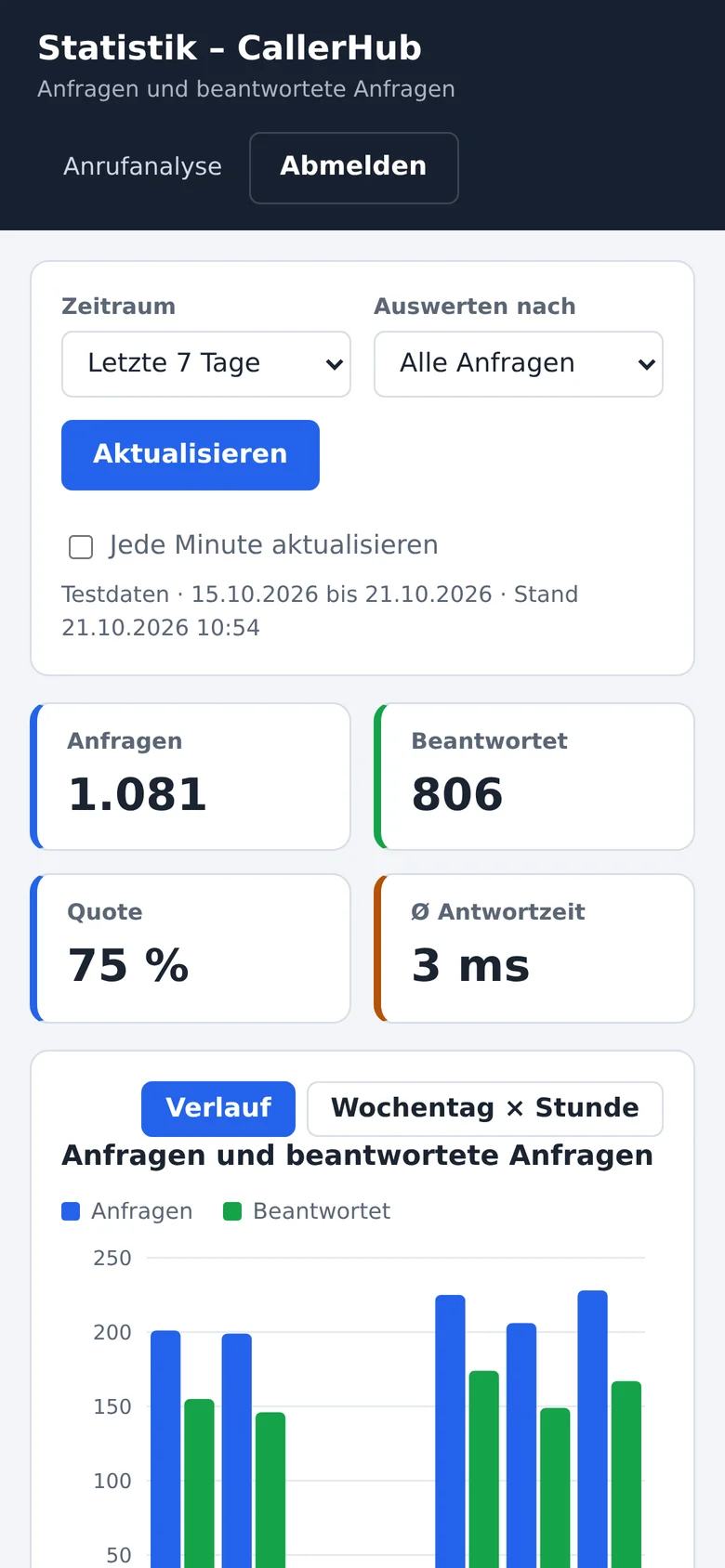
Requests, matches and unknown callers for any time period – broken down by called number, user, IP address, data source (hit rate per source), interface or caller. A weekday × hour heat map shows peak times. Chart and table can be exported as CSV.
For each request, CallerHub stores time, IP address, status, match, duration, source, interface, called number, user, the masked phone number and an irreversible hash. CallerHub does not store the full phone number.


Call analytics
The module analyses the call records of the phone system. The reports follow common call accounting and contact centre reports.
| Area | Basic edition | Full edition adds |
|---|---|---|
| Key figures | Calls, answered, missed, answer rate, Ø waiting time, Ø talk time | Service level (answered within 20 seconds), callback rate |
| Trend | Calls and answered calls per hour, day or month | missed calls per weekday and hour |
| Report by | Day | Weekday, time of day, extension, caller, interface |
| Output | Table as CSV, in the browser, as PDF in scheduled reports | |
A report by extension may enable monitoring of performance or behaviour. Before using it, the works council (in Germany Section 87(1) No. 6 BetrVG) and employees may need to be involved.
Where the call records come from is shown on the phone systems page. Test data shows both reports as long as no real data is available; CallerHub labels it and does not store it.
Live view and callback list
The live view shows per team who is waiting right now, the longest wait and calls in progress – plus calls today, answer rate and Ø time to answer. It runs in the app, in the browser or on a wallboard.
The callback list (Report by → Open callbacks) lists missed callers of the last 7 days without a callback, oldest first. “Take over” shows everyone who is handling it; “Done” removes the customer from the list. When an employee calls back from the phone system, CallerHub usually detects the callback on its own.
The callback list is part of the full edition of call analytics.


Team success
Positive employee reporting without leaderboards. Every employee opens their personal link on the company network – in the browser, on a phone, as a Teams tab or as a favourite in the STARFACE client – and sees only themselves: who they helped today, small successes, thanks, their own goal and the team as a whole.
Team leads see the team goal and milestones, praise suggestions with a concrete occasion and the thank-you wall, and can enter thanks or customer praise.
Reports per employee are subject to co-determination (in Germany Section 87(1) No. 6 BetrVG). With “Analyse employees anonymously”, CallerHub hides names and goals.
World map and customer view
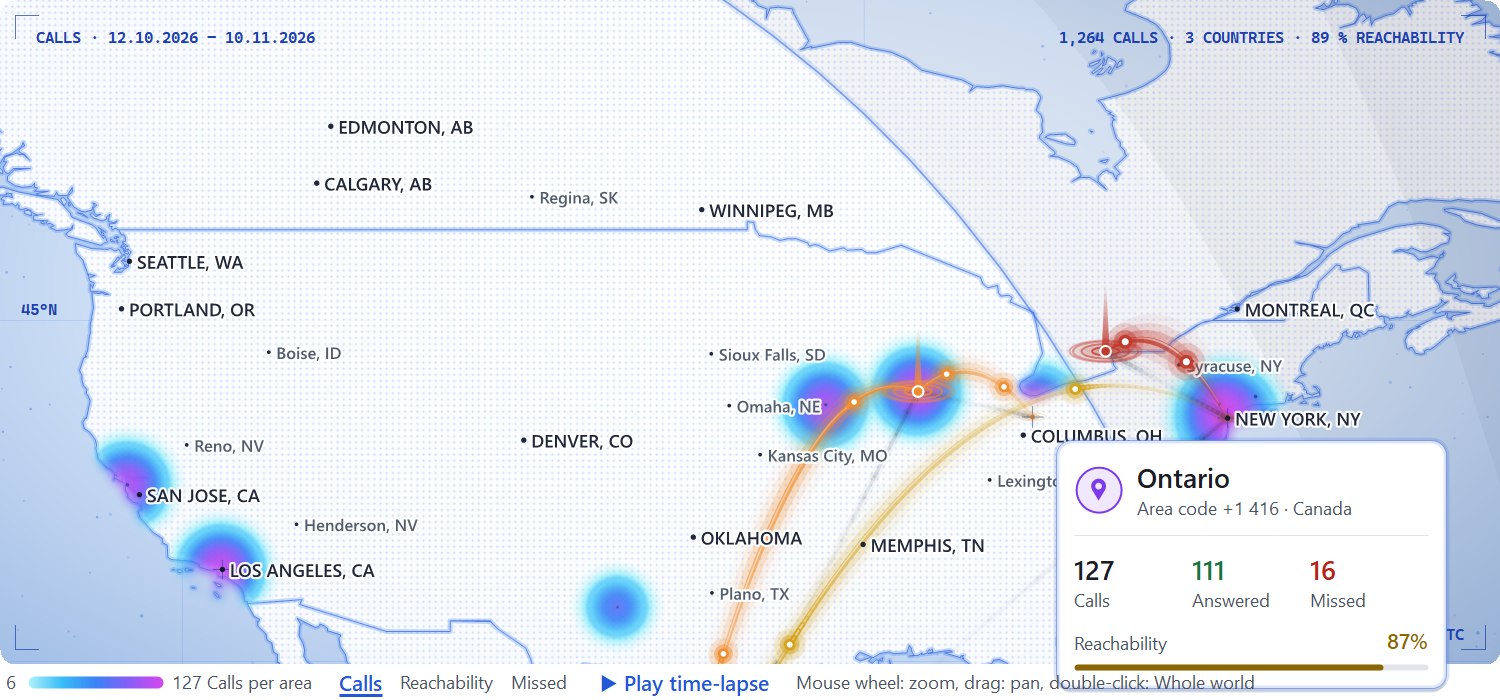
Under Report by → World map, call analytics shows where your calls come from – like a view from orbit: a starry sky, countries with a fine dot grid and glowing borders, the glow of the areas and the call flows as arcs in space with slowly travelling comets. CallerHub recognises the country from the country code and the place from the area code. Each phone system stands at its location with ground rings and a column of light, and the map centres on your phone systems. A click on a country, an area or a phone system filters the report; zooming in shows the place names. It is also available as a tile on the home page and, on the personal page, with your own calls only.
Heat map of the areas: with the Phone numbers module, the map shows for the figure Calls which areas the calls come from. The more calls come from an area, the brighter it glows – from purple through orange to light yellow. Hover over it to see the place, area code and figures; a click filters by the country. The glow stays within its country and fades softly at the border; zooming in resolves it down to single areas.
The customer view counts customers instead of calls: someone who calls three times in a day and then reaches someone counts once as reached. It adds the team goal with a streak, “Why missed?” (all busy, someone was free, hung up immediately, outside business hours), “Good moments” (called back, stepped in, reached quickly) and “Quiet times”.

Phone numbers: area, network operator, local time
CallerHub splits every phone number using the numbering plan of the libphonenumber library for more than 240 countries: country code, area code, type of number and national format. This applies to caller recognition, the data sources, the world map and all reports. The Phone numbers module (on by default) controls with four switches what is shown.
| Switch | What CallerHub shows |
|---|---|
| Show area | Place and area code of a landline number, e.g. “Stuttgart (0711)”, abroad with the country, e.g. “Zürich (+41 44), Switzerland” – for unknown callers, in the number check, in the table “Calls by area” and as a heat map on the world map |
| Show network operator | Operator that assigned a mobile number, e.g. “Vodafone (originally)”, and the table “Mobile networks”; numbers can be ported to another network, so treat this as an indication |
| Show local time | The caller’s time for foreign numbers with a single time zone – in the callback list, live view and number check |
| Recognise several numbers in one field | If a field of the data source contains e.g. “Tel. 030 23125456, mobile 0171 3920012”, CallerHub adds each valid number separately (database, REST, LDAP, Microsoft 365, Exchange) |
For administrators, call analytics shows under Report by → Phone numbers the tables “Calls by area” and “Mobile networks” with all figures, plus calls by number type, frequent unknown callers and premium-rate numbers. Mobile and premium-rate numbers have no area. With the module switched off, CallerHub shows only the type and format of the numbers; caller recognition works unchanged.

The library is updated with every release; its version is shown in the About window. Licences of the library and the place data: Documents.
My page, sign-in by phone and number check
Every employee has a personal page in the browser: My week with customers helped, callbacks and thanks, a self-chosen goal only they can see and – if the company wishes – the nudge “take two or three minutes” after a long call. Team leads see their team, management sees sites and the group – always as totals; individual figures are visible only to the person themselves.
Signing in needs no password: the page shows a one-time 6-digit code that you dial on your own phone. A live connection recognises the extension; the code is valid for 2 minutes and only once.
Number check answers the most common question: why does the phone show this name – or none? CallerHub shows the normalised number, every match per data source, which one wins and why. Without a match, it suggests similar numbers.

Display name, block and VIP list
Rules exist globally and per data source. Replacements shorten long names for narrow displays (GmbH & Co. KG;GmbH & Co.). Blocked numbers get no name or a fixed name; * stands for all numbers starting with this prefix (+49900*). The VIP list puts a text such as “VIP” or “★” in front of the name.
Browser access
Statistics and call analytics are also available in the browser, for example for team leads on a smartphone. For CTI pop-ups, a link redirects to the CRM record.
All functions use their own access key, separate from the API key, and optionally their own IP allow lists. The pages load no external content. Over HTTP, the key is transmitted unencrypted; therefore offer access only on the internal network or via HTTPS.
Your own table view: every table has the crossed-out eye icon at the right of the table header. Use it to show or hide columns and move them left or right with ← →; you can also drag the header with the mouse. On the staff pages, the browser remembers the view on this device; in browser administration it is shared by app and browser.

Monitoring
Monitoring systems query CallerHub on the interface port. You choose which metrics CallerHub provides: interface status, data sources, requests, response time with thresholds, live reception, call events, licence term and system.
| System | Setting |
|---|---|
| Nagios, Icinga, Checkmk | check_http |
| PRTG | Sensor “HTTP Data Advanced” |
| Zabbix | HTTP agent (JSON), dependent items with JSONPath |
| Prometheus / Grafana | key as authorization in the scrape configuration |
Endpoints and parameters for monitoring are available on request from support.
Notifications and scheduled reports
CallerHub sends notifications by e-mail (SMTP with STARTTLS, SSL/TLS or unencrypted) and webhook in the format for Microsoft Teams, Slack or as JSON when a data source fails or no requests arrive for a while – and when the problem is resolved. Notifications contain no phone numbers.
Up to 20 scheduled reports go out daily, weekly or monthly to their own recipients: by e-mail as PDF, as a message to Teams or Slack, or as JSON with the PDF in Base64. The content is any combination of statistics, call analytics and log.
Call analytics thresholds (off by default): CallerHub alerts you when a caller waits longer than “red” in the live view, the reachability for the day falls below a set value or too many calls are missed within a short time – using the same figures as the live view, optionally only during business hours, at most once per occasion within the set interval and, if desired, with an all-clear. With several phone systems, CallerHub checks each one separately. Alerts can go to their own recipients or their own Teams channel, for example for team leads.

Forward call events
CallerHub forwards calls to other systems – to a CRM that logs calls, a ticket system, time tracking or your own script. Events are incoming, outgoing, missed, redirected, answered and ended.
Actions are a text via TCP, starting a program or script, or an HTTP call. Actions run in the background; the response to the phone system never waits for them. Details on request from support.
Plugins
Plugins run your own logic per call, such as an “outside business hours” note or the origin of unknown callers. They run isolated in a separate process without network access. Plugins see no passwords and no settings of other areas.
Sample plugins: business hours, origin (mobile or country) and spelling. The interface for your own plugins is available on request from support.

AI assistant
CallerHub does not call any AI interface. It puts together a question with context – for example about an error message, an SQL query or the system health –, obscures phone numbers, e-mail addresses, IP addresses, passwords and keys, shows the text for review, copies it to the clipboard and opens the Claude chat in the browser. You decide whether to paste and send it.
Network discovery and phone system simulator
Network discovery finds databases, directories, mail servers and phone systems on your own network and checks the configured services. It is off by default, starts only after confirmation, only establishes connections without signing in and checks at most 1,024 addresses per search. “Use” adopts a result directly as a data source, mail server or recipient.
The phone system simulator simulates any number of phone systems against a CallerHub installation – for testing a setup and as a load test from one call per minute up to the highest possible rate.
Administration, operation and log
Updates from the app: “Check for updates” asks callerhub.de for a new version; “Install update” verifies size, SHA-256 checksum and signature, backs up the previous file and starts the new one.
System health checks interface, network, security, data sources, permissions and operation every five minutes and offers a fix button for many entries, for example for the firewall rule or the URL reservation.
Order by dragging: data source and interface cards, tiles of the home page and call analytics, and table rows whose order matters (e.g. the keys of phone provisioning) are dragged by the dot handle to a new position – in the app and in the browser. A dashed line shows where they will land; at the top and bottom edge the page scrolls along.


A little better every week.
Highlights from the latest versions of CallerHub 3.0. The app fetches updates itself: Administration → Update.
- Build 317–322 · pre-release
World map from orbit
The world map shows your calls as seen from orbit: a starry sky, countries with glowing borders, the glow of the areas, arcs in space with comets, phone systems with a column of light and place names as you zoom in; the map centres on your phone systems, the borders are finer. CallerHub opens instantly, loads in the background and only redraws what changes – calmer over Remote Desktop, too. The info dialog has a new design, and the Called column shows numbers in a readable format.
- Build 310–316 · pre-release
Areas and heat map
The new Phone numbers module shows the area with its area code, the network operator and the local time and recognises several numbers in one field of the data source; the world map shows the areas as a heat map. Tables in the browser show, hide and move columns via the crossed-out eye. Cards, tiles and rows drag smoothly, with a dashed line marking the insertion point.
- Build 304–309 · pre-release
Arabic mirrored, licence per server
Arabic appears fully mirrored from right to left in the app and the browser. Resolved names come with the number, and a magnifier opens the number check. In the user menu of the staff page, “Set up certificate” guides you through trusting the HTTPS certificate. Licence keys apply per server via its installation code.
- Build 299–303
Understand every number
Unknown callers show type and location, e.g. “Landline · Stuttgart”; international numbers come with the local time, marked with a moon at night. For administrators, the “Phone numbers” report shows the share of recognised callers and frequent unknown numbers to add to the CRM. Invalid numbers from the data sources end up in a list for correction; over remote desktop the interface runs noticeably smoother.
- Build 298
Made for phones
Filters and selection fields of the browser pages use the full width on phones; the help explains the new tile names and what “reached” counts.
- Build 292–296
A clear visibility rule
Individual figures are visible only to the person themselves; team leads and management see totals. Columns can be reordered by dragging in every table; connections pause after a rejected sign-in instead of locking accounts.
- Build 287
Check figures
System health cross-checks every view of every person – so the app, the browser and the PDF report show the same figures.
- Build 280–284
World map and own figures
World map with click filter, legend, time-lapse and comparison with the previous period. Own figures count only calls you handled yourself; reports with shorter column headers.
Rebranding for resellers
With a special licence, resellers deliver CallerHub under their own program name, logo and contact. Licence texts, licence keys, help, service name and program files remain unchanged; “About” shows the note “Based on CallerHub”.